I`ve so far been hosting and sharing my pictures on Flickr. Without doubt, Flickr is the best site to host and share your photos if you are into photography. Some of the features that set it apart are the ability to share your photos in different sizes, the brilliant Flickr communities and groups, and its interoperability and outreach with a host of other sites and applications, ranging from mobile phones to social networking sites. If I had a choice, I`d stick with Flickr year after year, but there's a con. For unlimited capacity for uploading and sharing, one has to have a paid account, and it comes at $24 per year. That's only about £15 and well worth it, but I just taken the decision to return and settle in India and I have no Idea what awaits me there...and with a membership costing more than Rs 1100, i have to reconsider my options.

And so I began my search, I came across several sites which professed to be free, but they all had restrictions on upload capacity per month (picasa, smugmug, photobucket etc). However I soon found one that appeared to be truly free – Zooomr

..and whats more, Zooomr is a clone of flickr, intergrating most of flickr’s best features into it …albeit a bit clumsily. I would say Zooomr feels like the poor man’s Flickr!
Signing up for Zoomr is easy enough, but what I found most annoying was that there was no demo or FAQ section explaining what exactly Zoomr is about and what its restrictions are.
Once I signed up and logged in, I was presented with a clunky, cluttered interface which threw too many things at me. They call it a zipline, and it presents an update on all your contacts in Zooomr. I hated the dull blue colour of the header too.

The problem was the owners were automatically in my zipline, and I couldnt figure out how to get rid of them for a while. Finally I discovered that I could do so by placing my cursor on their name, which brings up an option to unfollow them. Coming from a very professional Flickr interface I initially found Zooomr unimpressive. Well, once you get the hang of it and you accept that it all comes free Zooomr starts to gain on you.
Once that was done, my next aim was to upload a few photos. This was simple enough as the “upload” link above the page took me to the web upload page. That was when I realised that Zooomr did not have its own desktop application for uploading multiple images at one go!

But there was a saving grace – a third party application that works with Zooomr called jUploadr which could be accessed from the Zooomr knowledge centre.

Interestingly jUploadr works without even an install and can also handle Flickr accounts. Only that you need to authorise it to your Zooomr account just as you would for flickr. Photos can be dragged and dropped into the uploadr. You can change the preferences to set your photos as public or private, and options to resize it to various sizes before upload.

Once the upload is complete, photos can be seen on your zipline and clicking on an individual image will take you to the photo with a number of options . See the video below for available options.
As seen above, the photo may be tagged, geo tagged, allotted a licence and copyright etc. The Exif information available was indeed impressive, and better that of even Flickr. One noticeable feature is the ability to set a value for your image – right from within Zooomr. Brilliant!

Clicking on the magnifying lens sign above each photo gives you options to download various sizes of it and the code for embedding the photo.
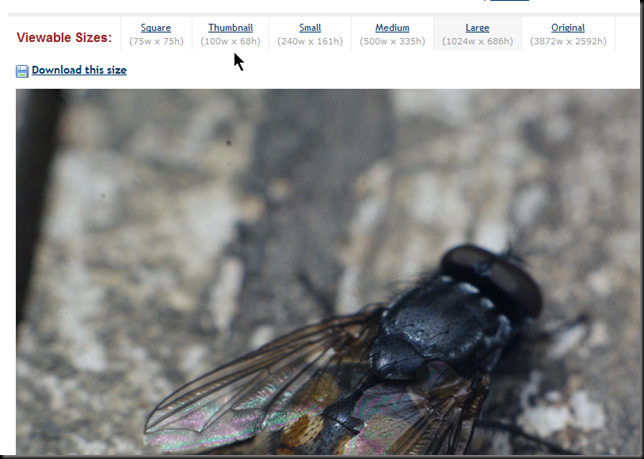
Annoyingly, it doesn’t give the photo’s url, but thats not really a problem as the url can be accessed in other ways. 
All in all, as I mentioned before, Zooomr reproduces most of Flickr’s features and even goes one up on it on a few areas. However, one thing I will greatly miss is the Flickr groups . The interface is not to my taste though and sometimes the way it loads is messy and flawed. What zooomr also lacks is the ability to organise photos in bulk as in the flickr organiser.I hope that as Zoomr becomes more popular, it will not only get better but will also have more third party clients and plugins available (eg: for windows live writer or importing photos from flickr etc). Meanwhile while Zooomr tries to figure out if its more of a scoial networking site or a photography site, I`ll stick with flickr until its time to leave.


